


Your job acceptance email is your first professional deliverable in your new role and it sets the tone for everything that follows.
I've tracked hundreds of job-related emails through MailTracker, and I've noticed something: candidates who send clear, specific acceptance emails start strong.
Those who send "I accept!" messages? They end up in awkward clarification threads, asking HR basic questions 3-5 times before they even start.
The difference isn't about being formal or writing long emails. It's about being specific upfront.
When I analyzed our Job Interview Case Study, candidates who confirmed four key details (title, salary, start date, manager) had zero follow-up confusion.
Those who didn't? Multiple back-and-forth emails that could've been avoided.
Below, I'm walking you through exactly how to accept a job offer via email, plus 10 templates for different situations.
What I've Learned About Accepting Job Offers
After talking with dozens of people who've accepted offers and tracking their email threads, I've noticed a pattern. The smoothest acceptances all follow these 5 principles:
1. Confirm the Four Key Details Upfront
Always restate: job title, starting salary, start date, and direct manager (if known). I've seen cases where the offer said "Marketing Manager" and the contract said "Marketing Coordinator", confirming it in your acceptance email prevents those issues.
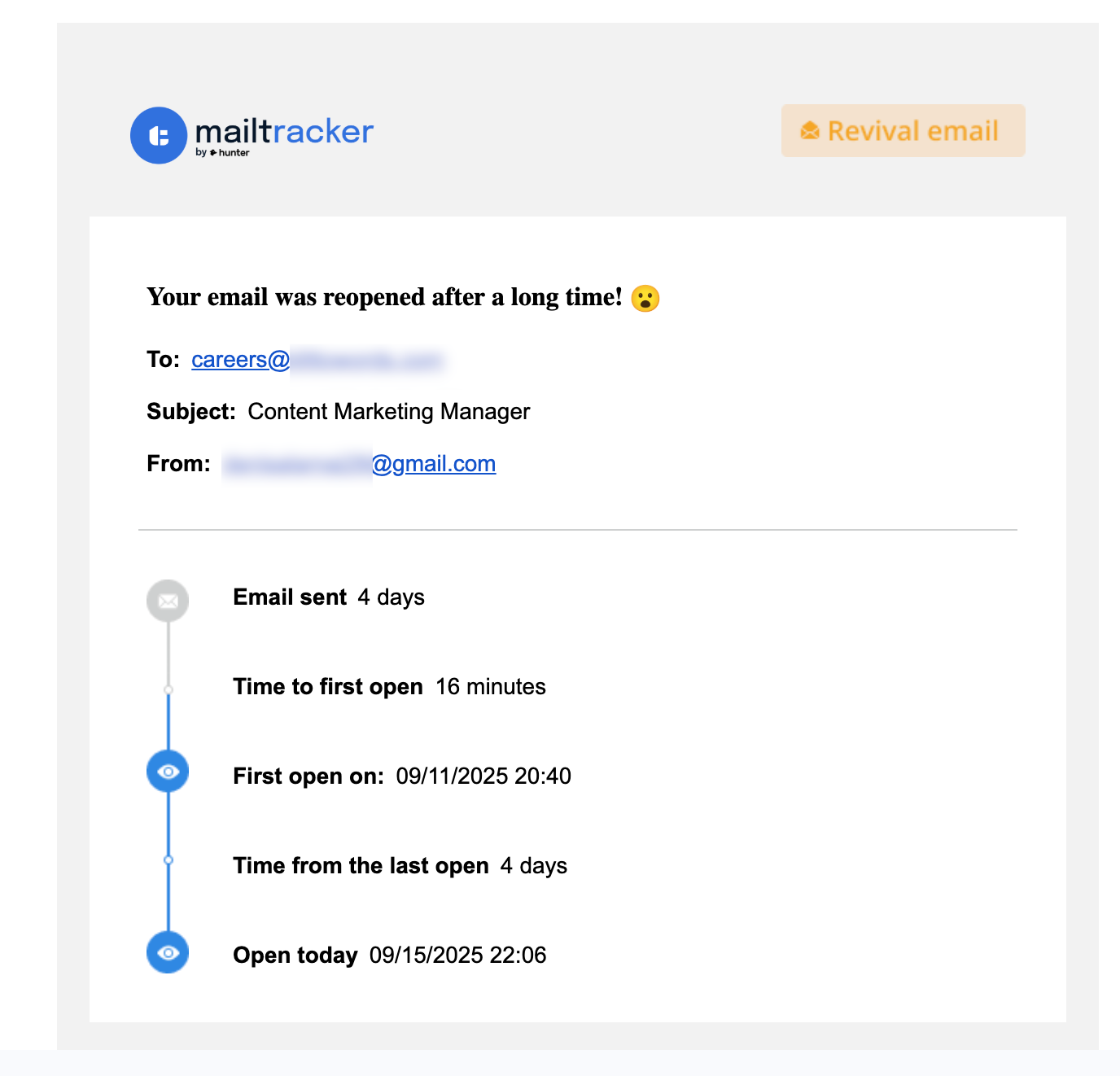
This job application for a Content Marketing Manager role was reopened 4 days later. It shows how HR reviews emails multiple times during the hiring process.
2. Negotiate Before You Accept
Once you send "I accept," your leverage is gone. Only hit send when you're 100% happy with the terms. If you're still thinking about salary or benefits, don't send this email yet.
3. Get It in Writing
Even if you said yes on the phone, follow up with a written email. You need a paper trail. I've talked with people who had verbal agreements fall through because nothing was documented.
4. Reply All to the Original Thread
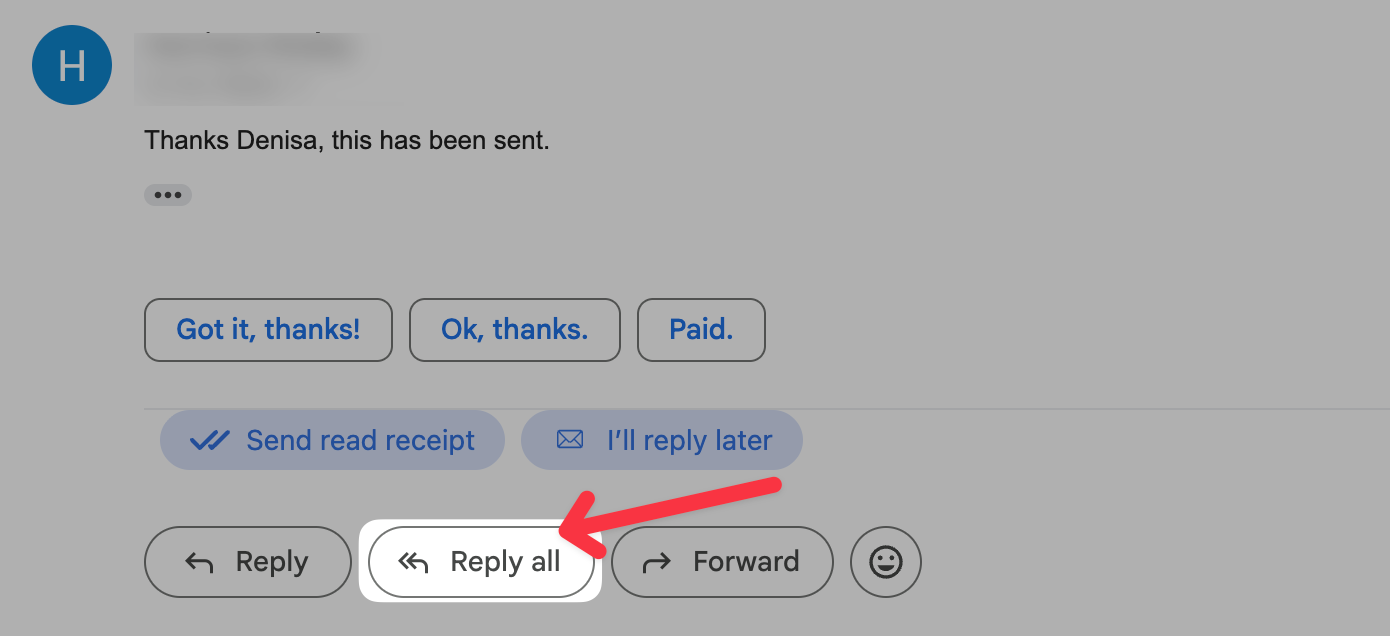
Always "Reply All" to the offer email so HR, the recruiter, and your hiring manager are all in the loop. Don't create a new email chain, it causes confusion about who knows what.
5. Ask About Next Steps
At the end of your acceptance, ask what happens next for onboarding. It shows you're proactive and ready to start, and it keeps the process moving forward.
10 Job Offer Acceptance Email Examples
1. The Simple Acceptance
Best for: When the offer is exactly what you expected and you're ready to sign.
Subject: Job Offer Acceptance – [Your Name]
Hi [Hiring Manager's Name],
Thanks for the offer for the [Job Title] position at [Company Name]. I'm excited to accept and confirm my start date as [Date].
As we discussed, my starting salary will be [Amount]. I'm looking forward to joining the team!
Let me know what the next steps are for onboarding.
Thanks, [Your Name]
2. Acceptance + Benefits Question
Best for: When you're ready to accept but need clarity on health insurance or 401k before you finalize.
Subject: Accepting the [Job Title] Offer – Quick Benefits Question
Hi [Hiring Manager's Name],
I'm happy to accept the [Job Title] position at [Company Name]. Thank you for this opportunity!
Before we move forward, could you share more details about the benefits package. Specifically health coverage and retirement plans? I want to make sure I understand everything as I wrap up my current role.
Looking forward to getting started on [Date].
Best, [Your Name]
3. Confirming a Verbal Offer in Writing
Best for: Following up after you said yes on the phone but haven't received the formal offer letter yet.
Subject: Following Up: Written Confirmation of Job Offer
Hi [Hiring Manager's Name],
Thanks again for the call earlier. I'm writing to officially accept the [Job Title] position at [Company Name].
I'm looking forward to reviewing the formal offer letter and confirming the final details.
Talk soon, [Your Name]
Tracking tip: When I send confirmation emails like this, I use MailTracker to see if HR has opened my email in Gmail. If it's been opened but I haven't heard back in 24 hours, I know to follow up.
4. Acceptance + Delayed Start Date Request
Best for: When you need to adjust the timeline because of your two-week notice period.
Subject: Accepting the Offer + Start Date Adjustment
Hi [Hiring Manager's Name],
I'm excited to accept the [Job Title] offer at [Company Name]. Thank you for this opportunity!
I'd like to request a slight adjustment to the start date, ideally beginning on [Proposed Date] instead of [Original Date]. This will allow me to give my current employer a full two-week notice and wrap things up properly.
Let me know if that works for the team.
Thanks, [Your Name]
5. Acceptance + Request for Offer Letter
Best for: When you've verbally accepted but HR hasn't sent the formal PDF yet.
Subject: Job Offer Acceptance – [Your Name]
Hi [Hiring Manager's Name],
I'm excited to formally accept the [Job Title] position at [Company Name].
Could you send over the official offer letter when you get a chance? I'd like to have a signed copy for my records as we move into onboarding.
Thanks so much! [Your Name]
6. Acceptance + Confirming Specific Terms
Best for: When you need to double-check something specific like remote work policy or equipment.
Subject: Accepting the [Job Title] Offer – Quick Clarification
Hi [Hiring Manager's Name],
I'm happy to formally accept the [Job Title] role. Thank you for the opportunity!
Before we finalize everything, I wanted to confirm the remote work arrangement we discussed. Just want to make sure we're aligned so I can hit the ground running on [Start Date].
Looking forward to it, [Your Name]
7. Acceptance + Pre-Planned PTO
Best for: When you have a wedding, trip, or move already scheduled and need to make sure it's accounted for.
Subject: Accepting the Offer + Quick PTO Question
Hi [Hiring Manager's Name],
I'm thrilled to accept the [Job Title] position at [Company Name]!
As I mentioned in my interview, I have a pre-planned commitment from [Date] to [Date]. I wanted to confirm that taking this time as unpaid leave (or accrued PTO) works with the team's schedule.
Thanks for understanding, and excited to get started! [Your Name]
8. Acceptance for Remote Roles
Best for: Making sure there's no confusion about office days or home equipment.
Subject: Accepting the Remote [Job Title] Position
Hi [Hiring Manager's Name],
I'm pleased to accept the [Job Title] role at [Company Name].
I'm excited to work remotely with the team. Let me know the process for equipment shipping or if there are any software setups I should handle before my start date on [Date].
Thanks, [Your Name]
9. Acceptance + Onboarding Inquiry
Best for: Showing initiative by asking for training materials upfront.
Subject: Job Offer Acceptance – Ready to Onboard
Hi [Hiring Manager's Name],
Thank you for this opportunity. I'm formally accepting the [Job Title] position and confirming my start date as [Date].
I'm eager to get started. Could you share any initial training materials or an agenda for my first week so I can start preparing?
Looking forward to it, [Your Name]
Why this works: I've tracked emails like this in MailTracker, and they consistently get opened by multiple people (HR, your manager, sometimes IT). It signals you're ready to contribute from day one.
10. Executive-Level Acceptance
Best for: Leadership roles where the tone should be more strategic.
Subject: Formal Acceptance: [Job Title] Position
Estimado [Nombre del responsable de contratación],
I'm honored to accept the offer to join [Company Name] as [Job Title].
I'm committed to achieving the goals we discussed around [insert key objective], and I'm looking forward to working with the leadership team. I confirm my start date of [Date] and am ready to begin the transition.
Sincerely, [Your Name]
What Happens After You Send Your Acceptance
Here's what I've learned from tracking acceptance emails: they almost always get opened multiple times.
First, your hiring manager opens it. Then, 20-30 minutes later, you'll see another open. Usually, HR or IT setting up your onboarding. Sometimes you'll see 3-4 opens in the first hour.
If you're using MailTracker to track your acceptance email, multiple opens without a reply isn't a red flag. It usually means your onboarding process is moving forward behind the scenes.
In our Email Never Opened Case Study, we found that high-stakes emails like job acceptances are almost never ignored. But they're just being circulated internally before you get a formal response.
Pro tip: If you see your email opened but don't hear back within 48 hours, it's okay to send a short follow-up: "Hi [Name], just wanted to make sure my acceptance email went through. Let me know if you need anything else from me!"
Quick Answers to Common Questions
Do I need to send a formal letter, or is email enough?
Email is fine. Just make sure it includes the four key details (title, salary, start date, manager).
Can I negotiate salary after I accept?
No. Negotiation needs to happen before you send the acceptance email. Once you formally accept, your leverage is gone.
How do I know they received my email?
Use MailTracker to see when HR opens your message. It gives you peace of mind and lets you know when to follow up if needed.

