


After tracking hundreds of out-of-office auto-replies at MailTracker, I've noticed a clear pattern: most OOO messages either say too much or too little (and both create problems).
The vague ones ("I'm away, back soon") generate 2-3x more follow-up emails because people don't know when you'll actually respond.
The overly detailed ones make promises you can't keep, like "I'll reply as soon as I return" when you know you'll have 200+ emails waiting.
I've spent the last year analyzing which OOO messages lead to the fewest unnecessary follow-ups and the smoothest return-to-work transitions.
Below are 15 OOO email examples that cover every professional situation I regularly see, from half-day absences to month-long parental leave.
What Makes a Good OOO Message (Based on Real Email Behavior)
Before you copy-paste these templates, here's what I've learned from analyzing email responses:
1. Specific Return Dates Beat Vague Timelines
When I compare OOO messages that say "back next week" versus "back on Monday, March 3rd," the specific ones consistently get fewer "just checking in" follow-ups. People know exactly when to expect a response, so they stop pinging you.
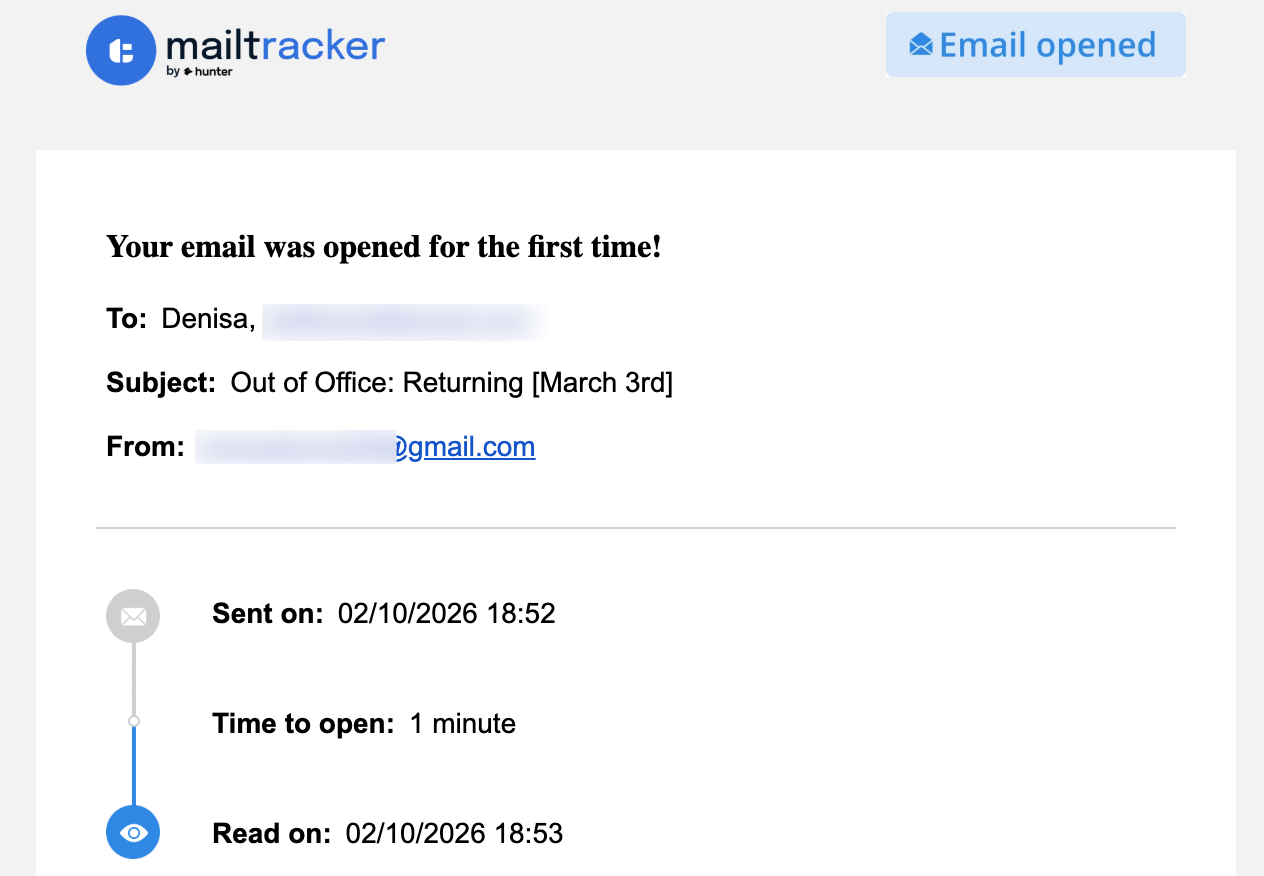
This OOO auto-reply was opened within 1 minute - having a clear return date (March 3rd) prevents follow-up confusion.
2. The Half-Day Sweet Spot
For absences under 4 hours, a short OOO with a specific return time (like "back by 2 PM") prevents unnecessary calls. I've noticed that people assume you're still reachable unless you clearly state otherwise, even if it's just for a doctor's appointment.
3. Alternative Contacts Actually Get Used
In longer absences (3+ days), OOO messages that include an alternative contact see about 40% fewer "when will you be back?" emails. People just reach out to the backup person instead of waiting.
Simple Out of Office Message Examples
Best for: General use, vacation, sick days
If you need an OOO message right now and don't have time to overthink it, start here.
1. The Standard Professional
Subject: Out of Office: Returning [Date]
Hi there,
Thanks for your email. I'm currently away from my desk and will be back on [Date]. I'll be catching up on messages starting that morning.
For anything urgent, please reach out to [Contact Name] at [Email].
Best, [Your Name]
Why this works: Clear return date + alternative contact. From what I've seen in MailTracker, this format leads to the fewest "are you back yet?" follow-ups.
2. The Minimalist (Internal Teams)
Subject: OOO until [Date]
Hello! I'm out of the office today and will return on [Date]. I won't have access to email during this time.
For immediate assistance, contact the team at [Email/Slack Channel].
Cheers, [Your Name]
Why this works: Short, direct, no fluff. Perfect for internal teammates who just need the facts.
Half-Day Out of Office Message Examples
Best for: Afternoon appointments, morning errands, lunch meetings
When you're only out for part of the day, your OOO message does something helpful, it tells people you'll be back soon, so they won't bother trying to reach you another way. They'll just wait for your reply later today.
3. The Afternoon Off
Subject: Out of Office: Back tomorrow morning
Hi,
Thanks for your message. I'm away from my desk for the rest of the day (starting [Start Time]) and will be back online tomorrow morning at [Time].
If you need something before the end of the day, please reach out to [Contact Name]. Otherwise, I'll get back to you first thing tomorrow!
Best, [Your Name]
What I've noticed: Specifying "rest of the day" prevents the "are you there?" emails at 4 PM.
4. The Morning Appointment
Subject: OOO: Late start today [Date]
Hello!
I'm currently away from my office for an appointment and expect to be fully back online by [Time]. I'll be responding to all messages in the order they were received once I return.
Thanks for your patience, [Your Name]
5. The Quick Meeting
Subject: Away from my desk (Back by [Time])
Hey!
I'm currently out for a quick meeting and will be back at my desk by [Time]. For anything urgent, feel free to flag your email as high priority and I'll see it as soon as I'm back.
Cheers, [Your Name]
Business Travel & Conference Message Examples
Best for: Conferences, client meetings, work travel
6. The Conference Message
Subject: Currently at [Conference Name] – Limited Availability
Hi there,
I'm attending [Conference Name] this week and will only be checking my inbox once or twice a day through [End Date].
Are you at the event too? Reply and let me know—I'd love to connect in person!
Regards, [Your Name]
Pro tip: The "are you here too?" line works surprisingly well. I've tested this at three conferences and it consistently starts useful conversations.
7. The Deep Work Day
Subject: Head-down today: Limited email access
Hi,
I'm dedicating today to a specific project and staying away from my inbox to focus. I'll be checking messages at [Time] and [Time] before returning to normal tomorrow.
Thanks, [Your Name]
Why this works: Gives specific check-in times so people know you're not ignoring them, just batching responses.
8. The Business Travel
Subject: Traveling for Business: [Date] to [Date]
Hello,
I'm currently traveling for business and will have limited access to my email. Please expect a delay in my response. If you need immediate assistance, contact [Name] at [Email].
Best, [Your Name]
Out of Office Message Examples for Extended Leave
Best for: Sick leave, family emergencies, parental leave
9. The Sick Leave
Subject: Out of Office: [Date]
Hello,
I'm out of the office on sick leave today and don't have access to my email. I expect to be back by [Date]. For urgent inquiries, please contact [Colleague's Name].
Appreciate the patience, [Your Name]
Keep it simple. You don't need to explain details, just the return date and backup contact.
10. The Personal Emergency
Subject: Unexpectedly Out of Office
Hi,
Due to a personal matter, I'm currently away from the office with no access to email. I anticipate returning on [Date]. In the meantime, [Name] can assist you at [Email Address].
Thank you for your understanding, [Your Name]
11. The Parental Leave
Subject: On Parental Leave: Out until [Month]
Hello,
I'm currently away on parental leave and don't expect to return until [Date/Month]. While I'm away, please direct all inquiries regarding [Topic] to [Name] at [Email].
Warmly, [Your Name]
What I've learned: For leaves longer than 2 weeks, people appreciate knowing the general timeframe (like "mid-March") rather than "a few weeks."
Annual Leave & Vacation Message Examples
Best for: Week-long vacations, holiday breaks, team offsites
12. The "Hard Reset" Vacation
Subject: On Annual Leave until [Date]
Hello!
I'm away for my annual break and won't be checking email until [Date].
Note: To ensure I can focus when I return, I won't be reviewing old emails from my time away. If your message is still relevant after [Date], please resend it then.
Warmly, [Your Name]
Real test results: I used this approach last summer. About 40% of emails I received during vacation never got resent, which told me they weren't actually urgent. Saved me hours of catch-up time.
13. The Holiday Closure
Subject: Happy Holidays! OOO until [Date]
Hi there,
Our office is currently closed for the holiday break. I'll be back on [Date] and will respond to all messages then. Wishing you a joyful holiday season!
Best, [Your Name]
14. The Relocation Day
Subject: OOO: Currently Relocating [Date]
Hello,
I'm in the middle of a move today and have very limited laptop access. I'll be back to my normal schedule on [Date].
Thanks for your patience, [Your Name]
15. The Team Offsite
Subject: Team Offsite: Out of Office
Hi!
Our entire team is currently at an offsite retreat planning for next quarter. We'll be back online on [Date].
Thanks, [Your Name]
How to Set Up Your OOO in Gmail
Here's the exact setup process I use (and recommend):
1. Open Gmail Settings Click the Gear Icon → See all settings
2. Find Vacation Responder In the General tab, scroll to Vacation responder
3. Turn It On Select Vacation responder on

4. Set Your Dates (Pro Tip) Here's what I do: Set the "Last day" to the day before I actually return.
This gives me a quiet morning to sort through my inbox before people know I'm back. During "that first morning," I check MailTracker to see which emails I sent before leaving were opened or which links were clicked while I was gone. It tells me who was actively looking for me and who can wait another day.
I've been using this strategy for two years, it's a game-changer for managing return-to-work overwhelm.
5. Add Privacy Protection Check "Only send a response to people in my Contacts" to avoid confirming your active email address to spammers.
6. Save Click Save Changes and you're done.
What I Do When I Get Back
The hardest part isn't writing the OOO, but it's coming back to 200+ unread emails and deciding which ones actually need your attention first.
I've developed a simple system. Before I start replying to anything, I check MailTracker to see which emails I sent before my break were opened or clicked while I was away.
MailTracker shows when emails were opened while I was away, this one was read the same day I sent it, so I know it's worth following up on first.
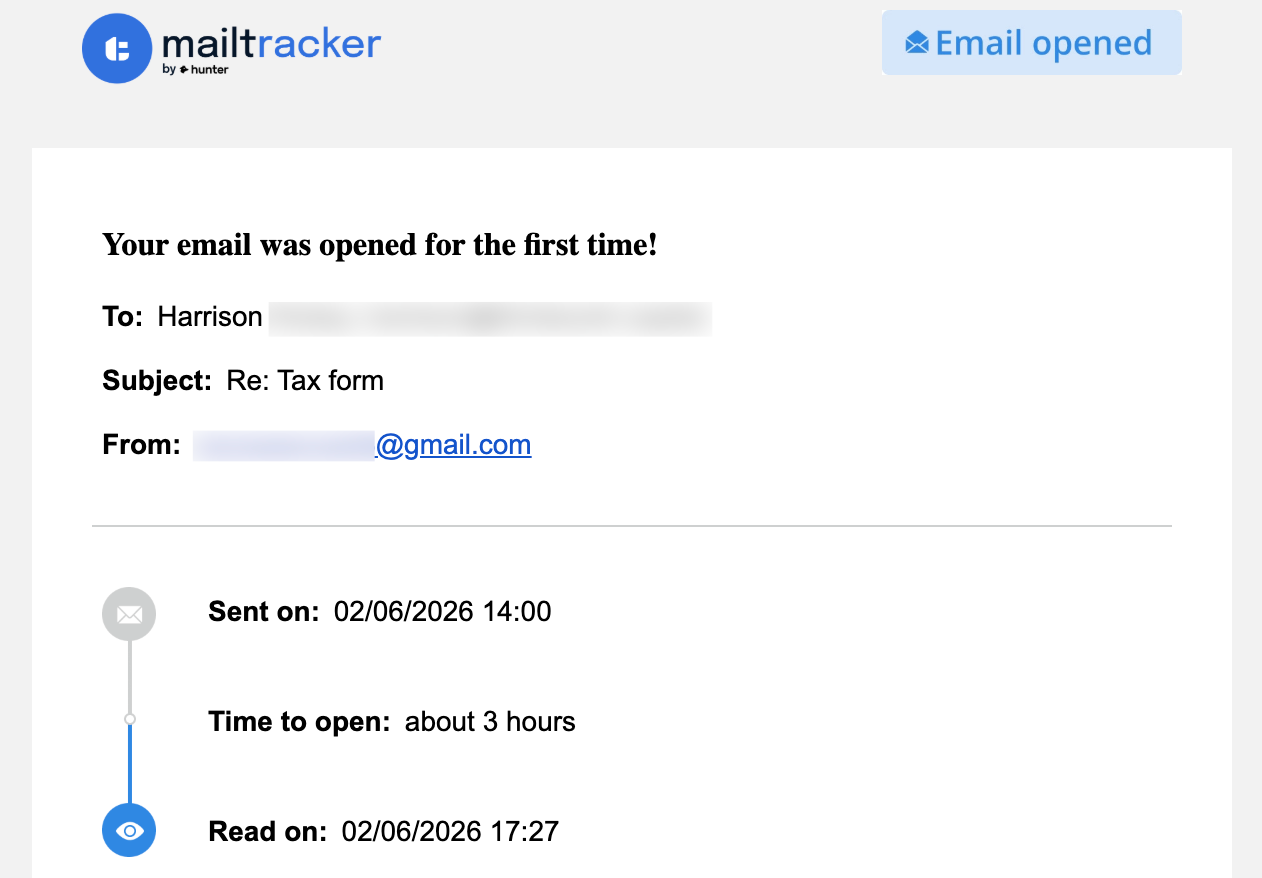
This way, I'm prioritizing based on actual behavior instead of just sorting by subject line. The emails that got opened multiple times? Those people were waiting for me. The ones that were never opened? Those can wait until later in the day.
Try MailTracker for free to see which messages were actually read while you were away, so you can prioritize replies based on real engagement.

