

You sent the email. Then the follow-up. And still nothing. No “thanks, I’ll get back to you”, no “not interested”. Just silence.
It’s frustrating, but it’s also normal. In a Backlinko study of 12 million outreach emails, 91.5% got no reply.
The good news? Silence rarely means a hard no. Often, your email simply got buried. And in the same study, sending one more follow-up increased replies by 65.8%.
In this guide, we’ll show you why people don’t reply, how to check if your email was even opened, what to send next (with templates), and when it’s time to move on.
TL;DR
- Silence after a follow-up is common, and it rarely means a hard no. Often, your email was missed, not rejected.
- Before writing again, check whether your emails were opened. Opened but no reply and not opened at all call for different next steps.
- Wait 3 to 5 business days after a follow-up before sending another one. Most replies come within 2 days, so waiting longer than a week rarely helps.
- Never send the same email twice. Change at least one thing each time: the subject line, the angle, a smaller ask, or the channel (try LinkedIn or a call).
- After 2 or 3 follow-ups with no reply, send a short, polite closing email. It gives them an easy way to answer, and you a clean way to move on.
Why Isn’t Anyone Replying to Your Follow-Up Email?
Silence after sending an email feels personal. It usually isn’t. Here are the most common reasons a follow-up goes unanswered ⤵️
- They never saw it. Your email landed in spam, in the Promotions tab, or under 50 newer messages.
- They saw it, but not at the right time. They read it on their phone between two meetings and meant to reply later. But later never came.
- They don’t have an answer yet. The decision isn’t theirs, the budget isn’t approved, or the hiring process is still running. Saying “I don’t know yet” feels awkward, so they say nothing.
- The ask is unclear or too big. “Any thoughts?” is hard to answer. “Can we talk for 15 minutes on Thursday?” is easy.
- They’re not interested. Some people don’t like saying no. Silence is their polite version of it.
In most of these cases, the door is still open. Your job is to find out which one you’re dealing with. And that starts with a simple question: did they open your email?
How to Tell If Your Email Was Even Opened
Before you write again, find out what happened to the emails you already sent. “Opened but no reply” and “never opened” are two different problems, and they don’t call for the same fix.
Gmail doesn’t tell you this on its own. Like most email service providers (ESPs), it has no built-in email tracking, and its read receipts only work with work or school accounts, where recipients can still decline to send one.
An email tracker like MailTracker fills the gap. It adds an invisible image to your email, and each time that image loads, it records an open. Check our guide on how email tracking works to learn more.
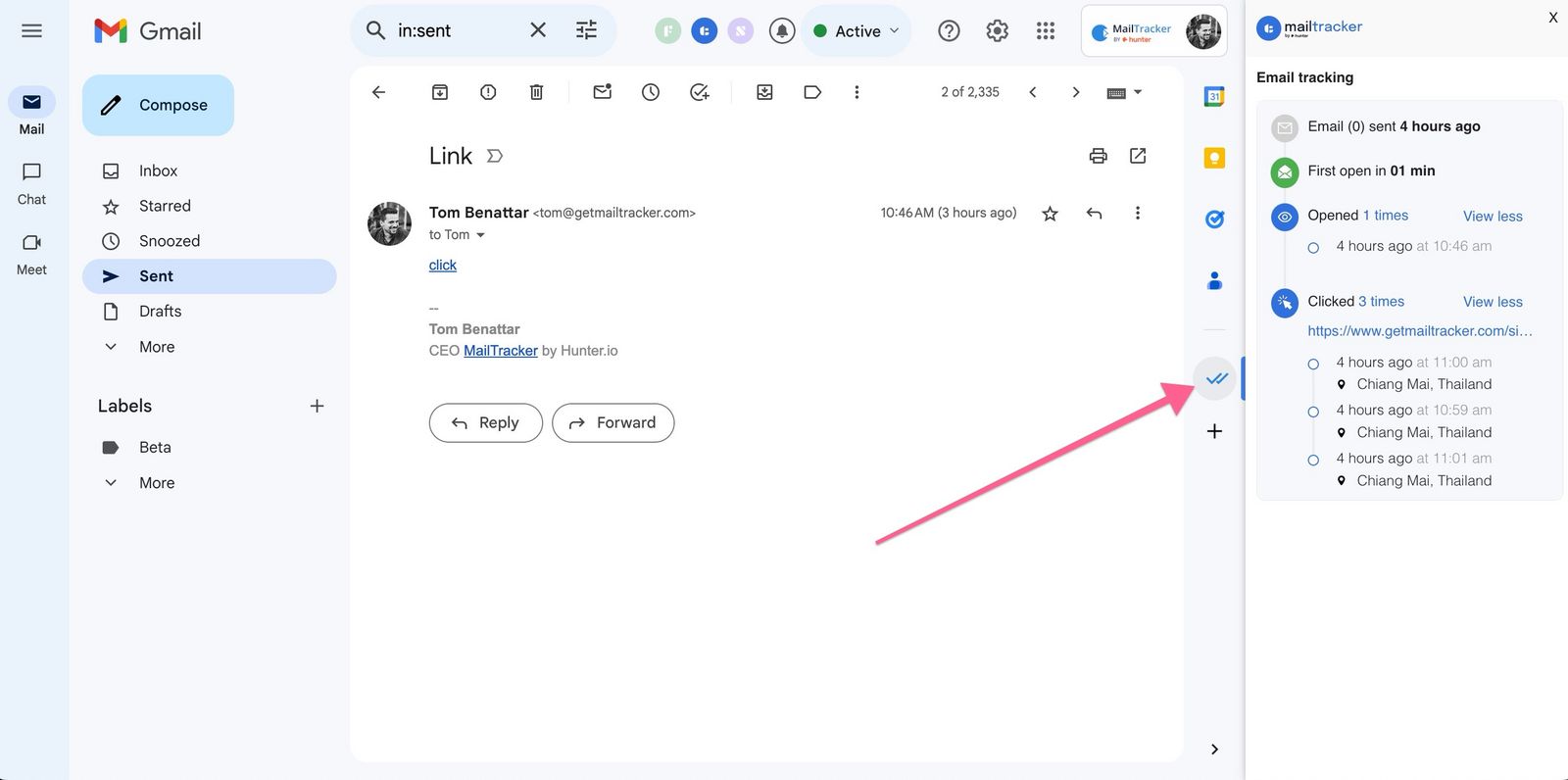
However, there’s a catch. A tracker only works on emails sent after you turn it on. It can’t tell you anything about the ones you’ve already sent. So if your first emails weren’t tracked, start with the next follow-up.
What to Do After a Follow-Up Gets No Response
The right next move depends on what happened to your last email. Here’s what each situation usually means, and what to do about it:
| What you see | What it likely means | What to do next |
|---|---|---|
| Not opened | They probably never saw your email. The subject line didn’t stand out, or the email landed in a busy inbox or the spam folder | Resend with a new, clearer subject line, at a different time of day |
| Opened once, no reply | They saw it but didn’t act. The ask or the value didn’t convince them | Change the angle. Add value, or make the ask smaller and more specific |
| Opened several times, no reply | They’re interested, or sharing your email internally | Make replying easy (a yes/no question), or propose a specific time |
| No signal at all, several weeks later | Not a priority right now | Send a short closing email and move on |
Whatever the situation, never send the same email twice. Each new message should change at least one thing: the subject line, the angle, the ask, or the channel.
If two emails went unread, a LinkedIn message or a phone call can get you an answer. Keep it light: “I sent you a quick email about X last week, did it reach you?”
How Long to Wait Before Following Up Again
Wait 3 to 5 business days after your follow-up before sending the next one.
Why that window? Because replies come fast or not at all. In a BuzzStream study of over 51 million outreach emails, almost 90% of replies arrived within 2 days.
If nothing has come back after a few days, waiting longer won’t change much. A new email, with a fresh angle, might.
Here’s a simple rhythm that works for most situations ⤵️
| When to send it | |
|---|---|
| First email | Day 0 |
| Follow-up 1 | 2 to 3 business days later |
| Follow-up 2 | 3 to 5 business days after follow-up 1 |
| Closing email | 1 to 2 weeks after follow-up 2 |
Adjust it to the context. After a job interview, stick to the timeline the recruiter gave you, and follow up a day or two after it passes. For a big decision, like a quote or a partnership, give people more room. For a quick question, you can go faster.
Avoid Monday mornings and Friday afternoons, when inboxes are at their most crowded or attention is at its lowest.
What to Write in Your Next Follow-Up Email (Free Templates)
Copy, paste, and adapt. Each template fits one of the situations above. Keep your email short. If it doesn’t fit on a phone screen, it’s too long.
1. If Your Email Wasn’t Opened
Use a new subject line. Don’t write “RE:” or “Following up” again.
Subject: [Specific topic] for [their company / the role]

Hi [First name],

I'm reaching out about [one-line summary of what you want].

[One sentence on why it matters to them.]

Would you be open to [small, specific ask] this week?

Thanks,
[Your name]
2. If Your Email Was Opened but Got No Reply
They saw it. So bring something new: a resource, a result, an idea.
Subject: Re: [Original subject]

Hi [First name],

I thought this might be useful: [link, idea, or short result related to their problem].

It's related to what I mentioned in my last email about [topic].

Worth a quick chat? I'm free [two specific time slots].

Best,
[Your name]
3. If Your Email Was Opened Several Times
They’re interested but stuck. Make replying take 5 seconds.
Subject: Re: [Original subject]

Hi [First name],

Quick question: is [topic] still on your radar?

A simple "yes", "not now" or "no" is perfect. Either way, it helps me plan.

Thanks,
[Your name]
4. After a Job Interview
Subject: Following up on the [job title] position

Hi [First name],

I hope you're doing well. I wanted to check in on the [job title] role I interviewed for on [date].

I'm still very excited about the opportunity, especially [one specific thing from the interview].

Is there any update on the timeline? Happy to share anything else you need.

Best regards,
[Your name]
5. The Closing Email
This is your last message. It works surprisingly often, because it’s honest and asks for nothing.
Subject: Should I close the loop?

Hi [First name],

I haven't heard back, so I'll assume [topic] isn't a priority right now. No problem at all.

I won't follow up again. If things change, just reply to this email and I'll pick it up from there.

All the best,
[Your name]
When to Stop Following Up
Persistence pays, up to a point. In a Backlinko study of 12 million outreach emails, sending 3 or more messages to the same contact got the best response rate.
Beyond that, you risk annoying people, getting blocked or flagged as spam, and hurting your reputation. A good rule of thumb: stop after 2 or 3 follow-ups, and end with a closing email.
Stop sooner if:
- They said no, even politely. Thank them and move on.
- They asked you to stop. Respect it right away. For commercial emails, the law often requires it too.
- Your emails were never opened, even after changing the subject line. Try another channel, or another contact at the same company.
Moving on doesn’t mean closing the door. Make a note to check back in a few months, with something new to say.
Track Your Follow-Ups with MailTracker
The hardest part of a follow-up is not knowing what happened. MailTracker gives you that answer, right in Gmail.
- See who opened your email, and when. Get a Chrome notification the first time it’s opened, and see how many times it was opened after that.
- Know who opened a group email. MailTracker identifies each recipient’s opens, so you follow up only with the people who haven’t.
- Get alerted when nothing happens. MailTracker tells you if an email hasn’t been opened within 48 hours.
- Never forget a follow-up. On paid plans, set follow-up reminders so the right email comes back to you at the right time.
- Track link clicks. On paid plans, see if they clicked your proposal, calendar link or portfolio.
The free plan tracks up to 20 emails per month, with no signature added to your emails, and no credit card required.
➤ Start tracking your follow-ups in Gmail (it’s free!)
FAQs
What should I do if someone doesn’t respond to my follow-up email?
First, check whether your emails were opened. If not, resend with a new subject line. If they were opened, send a new email with a different angle or a smaller ask. After 2 or 3 follow-ups with no reply, send a short closing email and move on.
How many follow-ups is too many?
Most people stop after 2 or 3 follow-ups, plus a closing email. Beyond that, you risk annoying the recipient and getting blocked or flagged as spam, which hurts your sender reputation. Stop right away if they say no or ask you to stop.
How long should I wait after a follow-up with no response?
Wait 3 to 5 business days before sending another email. In a BuzzStream study, almost 90% of replies arrived within 2 days, so waiting longer rarely changes the outcome. After a job interview, follow the timeline the recruiter gave you instead.
Is no response after a follow-up a no?
Not always. People often stay silent because they’re busy, waiting on someone else, never saw your email, or simply forgot to answer. If your email was opened several times, they may still be interested.
What should I do if there’s no response after a job interview follow-up?
Wait for the timeline the recruiter gave you, then send one polite check-in. If you still hear nothing a week later, send a short final email, and keep applying elsewhere in the meantime.
How do I know if my follow-up email was read?
Gmail can’t tell you for personal accounts. An email tracker like MailTracker can. It shows when your email was opened, how many times, and whether a link was clicked or a PDF opened. Turn it on before you send, as it can’t track emails already sent.
Sources
- We analyzed 12 million outreach emails, Backlinko with Pitchbox, April 2019
- How long does it take to get email outreach replies?, BuzzStream, May 2025
- Request or return a read receipt, Gmail Help
- MailTracker pricing

