


I send 40-50 tracked emails every week: client proposals, partnership pitches, follow-ups, job applications.
Over the past few months, I installed and tested 7 free Chrome extensions to see which ones deliver real tracking without hidden paywalls or fake "free" trials that expire in 3 days.
Some gave me 5 emails per month. Others gave me unlimited tracking but added signatures to my emails. A few had clunky UX that made tracking more annoying than helpful.
Here's what I found, based on actual use, Chrome Web Store ratings, and how much value you get before paying.
Quick Answer: 6 Free Email Tracking Extensions for Chrome
1. MailTracker: For clean, professional tracking with no signature. 20 emails/month free, paid from $29.99/month. (4.7/5, 5,000+ reviews)
2. Snov.io: For cold outreach where you need email finding and tracking in one place. 50 credits/month free, paid from $39/month. (4.9/5, 6,100+ reviews)
3. Mailmeteor: For sending personalized Gmail campaigns without a separate platform. 50 emails/day free, paid from $4.99/month. (4.7/5, 134 reviews)
4. RightInbox: For scheduling emails at specific times with light tracking on top. 5 tracked emails/month free, paid from $9.95/month. (4.6/5, 12,400+ reviews)
5. Mailsuite: For high-volume tracking where a signature trade-off is acceptable. Unlimited free with signature, paid from 9.99 EUR/month. (4.4/5, 11,500+ reviews)
6. Boomerang: For scheduling across time zones with AI writing assistance. 10 tracked emails/month free, paid from $4.98/month. (4.2/5, 2,100+ reviews)
How I Tested These Tools
I didn't just read feature lists, but I installed each extension, connected it to my Gmail, and sent real emails. Here's my process:
1. I tested the free plans myself (no credit card required, if a tool asked for payment info upfront, I didn't include it)
2. I tracked the actual free tier limits (some say "free" but only give you 5 emails/month, which isn't useful)
3. I checked Chrome Web Store reviews and G2 ratings (minimum 4.0 stars to make this list)
4. I measured real tracking features (open tracking, click tracking, notifications, not just "trial" baits that disappear)
Quick note on tracking accuracy: Email tracking isn't perfect. Some email clients block tracking pixels, so you might see "not opened" even if someone read your email. For that reason, I use email open rates as signals of engagement, not proof that someone did or didn’t read an email. This applies to every tool on this list.
6 Free Email Tracking Extensions for Chrome
1. MailTracker (For clean tracking without signatures)
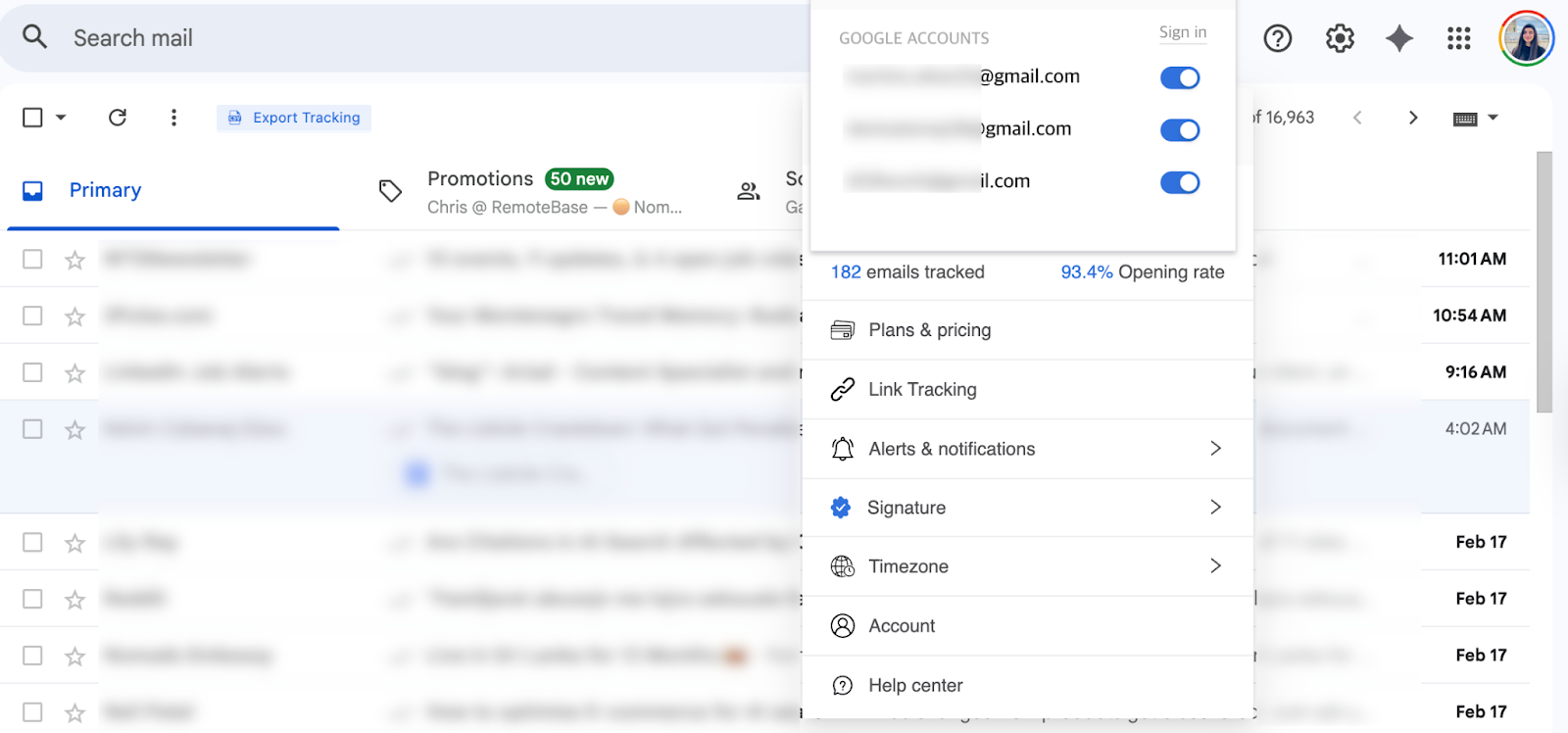
I've used MailTracker every day for the past 3 years across three Gmail accounts. Client proposals, partnership pitches, follow-ups. Anything where knowing what happens after I hit send actually matters.
What makes it different from every other tool on this list: it lives inside Gmail as a small icon, no external dashboard, no separate platform to log into. You send an email, and it's tracked automatically. No manual steps, no boxes to tick, no setup per email. It just works.
The notifications are real-time, not summaries. The moment someone opens your email, you get an email like so:

And it doesn't stop at the first open. If someone reopens your email 3 times over two days, you get notified each time, like in the screenshot below:

That reopen pattern is the most useful signal in practice.
One open could be a quick glance. Three reopens over 48 hours means they're thinking about it, sharing it, or coming back to it before making a decision.
The free plan gives you 20 tracked emails per month, enough for freelancers and consultants sending important one-off emails rather than bulk campaigns. No signature, no branding. Your emails look exactly the same as they always did.
MailTracker is rated 4.7/5 on the Chrome Web Store with over 4,900 reviews used by founders, freelancers, sales teams and more.

Key Features:
- Email open tracking with exact timestamps (see when first opened, how many times)
- Link click tracking inside your emails
- No signature or branding on free plan (emails stay professional)
- Real-time Chrome notifications when emails are opened
- Follow-up reminders for emails that aren't opened
Pricing: Track up to 20 emails per month for free. Paid plans start at $29.99/month for unlimited tracking.
My Experience: Before MailTracker, I'd send a proposal and just wait. Now I know exactly what's happening. If someone opens my email 3 times I follow up confidently, they're clearly thinking about it. If it's never opened after 3 days, I know the subject line was the problem, not the pitch.
That distinction alone changes how you respond. The limitation is the 20 email monthly cap on the free plan. But if you're sending more than that, the paid plan at $29.99/month is the only option. But you're paying for tracking that's invisible to recipients and automatic every single time.
The limitation: if you need to track more than 20 emails per month, you'll need the paid plan at $29.99/month, which is a bit pricier than some other tools on this list. But you're paying for the clean, no-signature tracking that keeps your emails professional.
2. Snov.io (For email finding + tracking + drip campaigns)
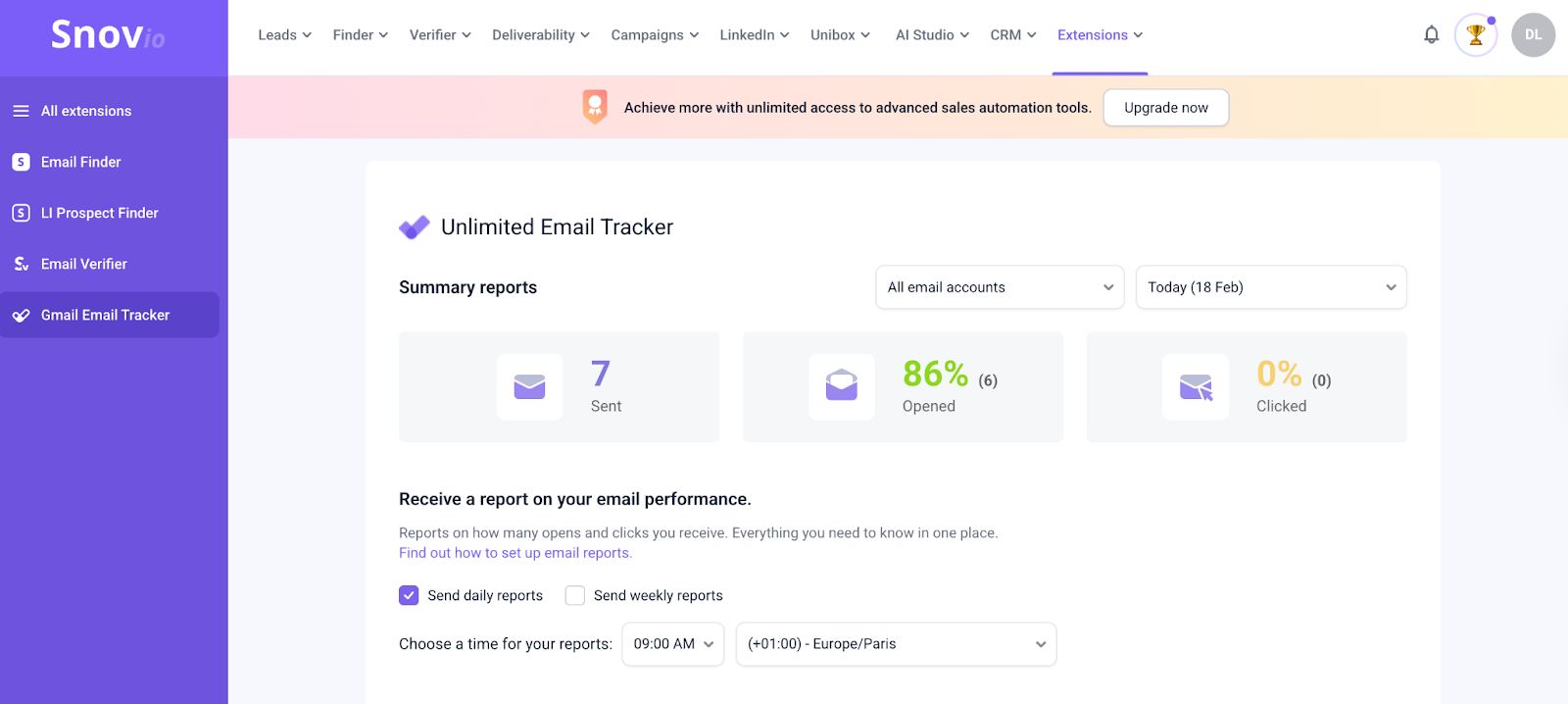
The screenshot above is from my own test: 7 emails sent, 86% open rate tracked through the Snov dashboard. It works. But notice where you're looking at that data: not inside Gmail, inside a separate platform.
Snov.io is rated 4.9/5 on the Chrome Web Store with over 6,100 reviews. I tested it when I needed to find email addresses and track outreach in one place.
Here's the thing nobody mentions upfront: installing the Chrome extension doesn't mean you're tracking from Gmail immediately. Unlike MailTracker or Mailsuite which activate inside Gmail in seconds, Snov redirects you to an external dashboard to set things up first.
There's more manual work involved before your first tracked email goes out, connecting accounts, navigating the platform, and understanding how credits work. If you just want to install something and start tracking, that friction is real.
Once you're set up, the free plan gives you 50 credits per month shared across finding emails, verifying them, and tracking sends. That credit pool goes fast, especially if you're using the email finder heavily alongside tracking.
The dashboard itself is powerful, but can feel like a lot if tracking is all you need. Snov is genuinely built for prospecting workflows: find an email on LinkedIn, verify it, add them to a drip campaign, track opens. If that's your use case, it earns its place. If you just want to know when someone opened your email, it's more tool than you need.
Key Features:
- Email finder and verification (find emails on any website)
- Email tracking with open and click notifications
- Drip campaigns with automated follow-ups
- Built-in email verifier (avoid bounces before sending)
- Campaign builder with drag-and-drop editor
- Works for prospecting and lead generation
Pricing: Free plan with 50 credits per month (used for finding, verifying, and tracking emails). Paid plans start at $39/month for more credits and unlimited tracking.
My Experience: I tested Snov for a 20-person outreach campaign and the tracking worked. 7 emails sent, 86% open rate visible inside the dashboard, you can see exactly who opened and when. But notice where you're looking at that data: not inside Gmail, inside a separate platform entirely. That's the trade-off in practice.
And when I decided to uninstall, Snov asked me to type out my reason manually. So no multiple choice, no quick selection. Small thing, but compared to every other tool on this list that either lets you uninstall cleanly or gives you a simple dropdown, it felt like friction deliberately designed to slow you down. Chrome Store reviews love the all-in-one approach, and it is genuinely powerful, but that experience on the way out stuck with me.
The limitation: 50 credits per month isn't much if you're running large campaigns, so you'll hit the paid plan quickly. But if you need email finding + tracking together, Snov is a suitable option.
3. Mailmeteor (For mail merge campaigns from Gmail)
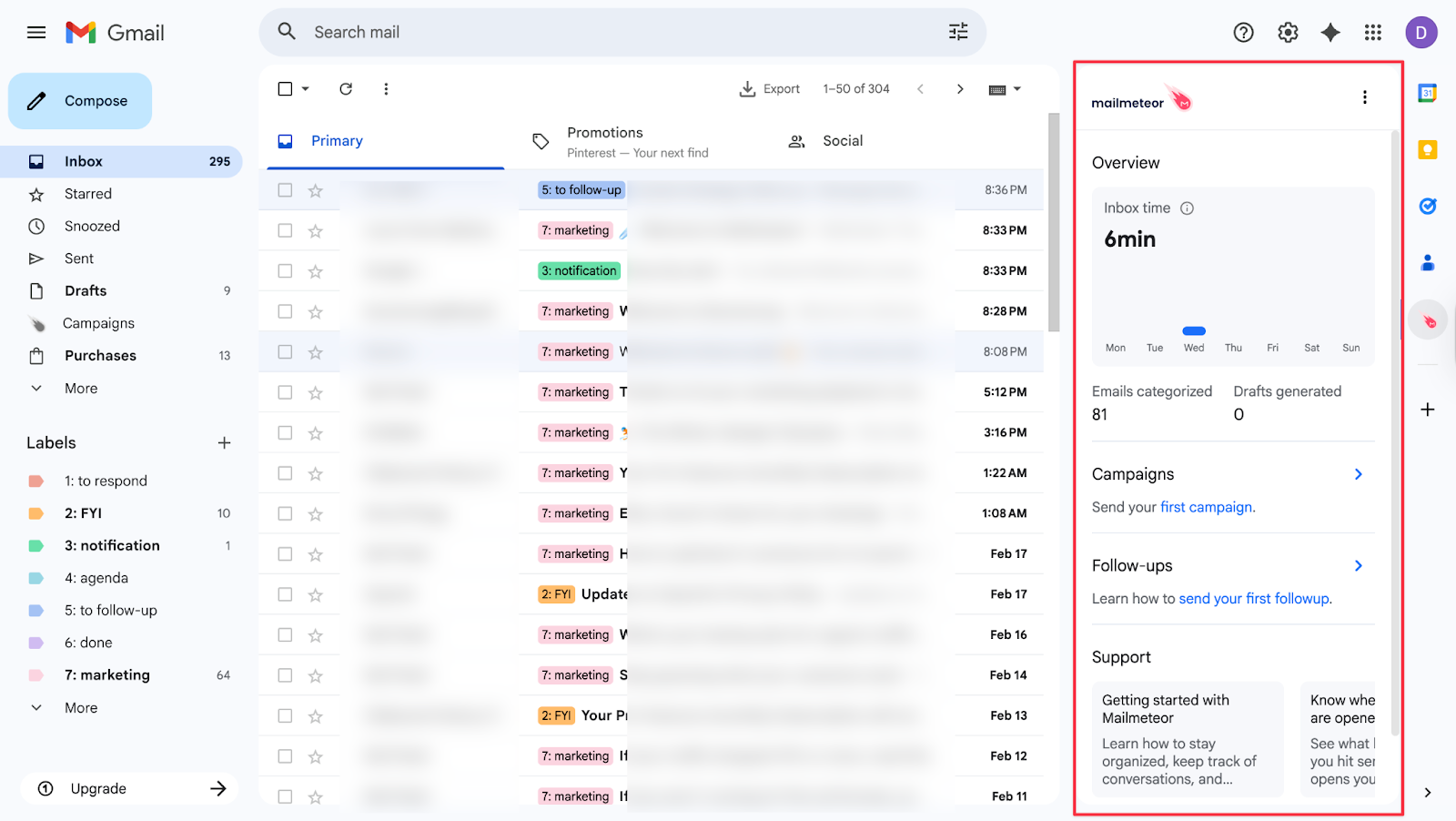
Mailmeteor lives inside Gmail, which sounds convenient until you realize it adds a permanent sidebar panel on the left that you can't collapse or remove. It's just there, every time you open Gmail. If you're someone who likes a clean inbox, that's genuinely distracting — not a dealbreaker, but something nobody mentions in the reviews.
The free plan gives you 50 tracked emails per day, which is solid for small personalized campaigns. The Google Sheets integration works well, import your contact list, personalize with mail merge, schedule follow-ups. Everything stays inside Gmail without switching platforms.
The signature issue is the other thing worth knowing upfront. Mailmeteor adds "Sender notified by Mailmeteor" to every email by default.
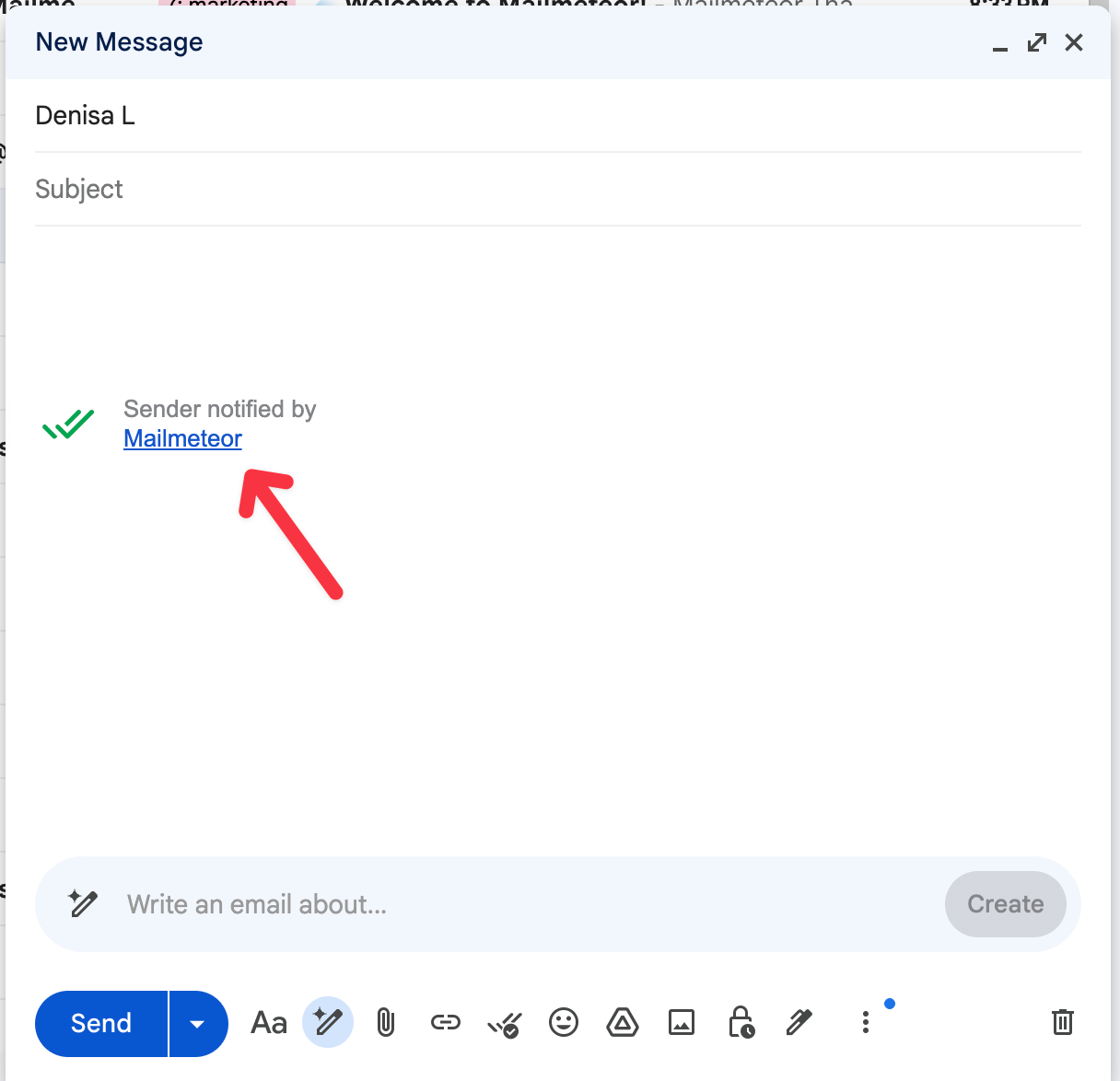
You can remove it manually before sending, but that means remembering to do it every single time. I caught it once after sending. For professional outreach where you don't want recipients knowing you're running mail merge campaigns, that's a real risk on the free plan.
Key Features:
- Send email campaigns directly from Gmail (no separate platform needed)
- Import contact lists from Google Sheets or CSV files
- Mail merge personalization (custom names, companies, details)
- Automated follow-ups until you get a reply
- Search and export emails for backup and organization
- Track opens and clicks for each campaign
Pricing: Track up to 50 emails per day for free. Paid plans start at $4.99/month for higher volume and advanced features.
My Experience: I use Mailmeteor when I need to send 20-50 personalized emails without paying for a full email marketing platform. The screenshot above shows exactly how it sits inside Gmail. The sidebar is always visible, and the signature shows up in the compose window by default. The Google Sheets integration is smooth and fast once you're set up.
Chrome Store reviews reflect the same experience: great for small teams and freelancers, but the sidebar and signature friction are mentioned consistently. If you're sending under 50 emails a day and don't mind the manual signature removal, it does the job.
4. RightInbox (For email scheduling with basic tracking)
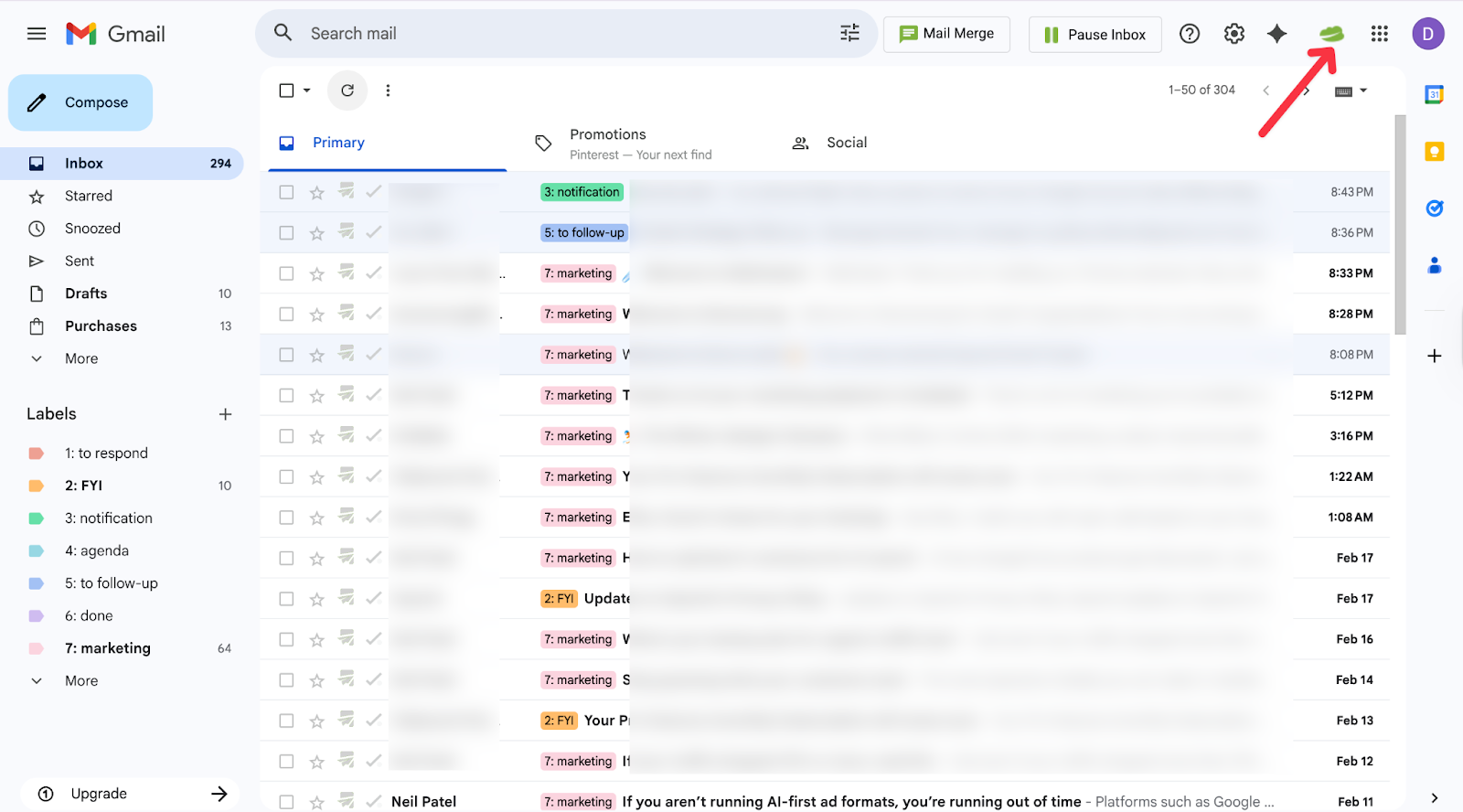
RightInbox is rated 4.6/5 on the Chrome Web Store with over 12,400 reviews. I tested it specifically for scheduling, sending follow-ups at specific times across different time zones without staying up late to hit send manually.
The UI is functional but feels dated compared to everything else on this list. It gets the job done, but if you're used to cleaner tools it shows. The extension sits in your Gmail toolbar as a small icon, less intrusive than Mailmeteor's sidebar, but the compose window is where the friction starts.
Every email defaults to "Sent with Right Inbox" signature. Removable, but manually, every single time. And if you want to track opens or clicks on a scheduled email, you have to manually tick the Track Opens and Track Clicks boxes in the compose window before hitting Send Later. It's not automatic.
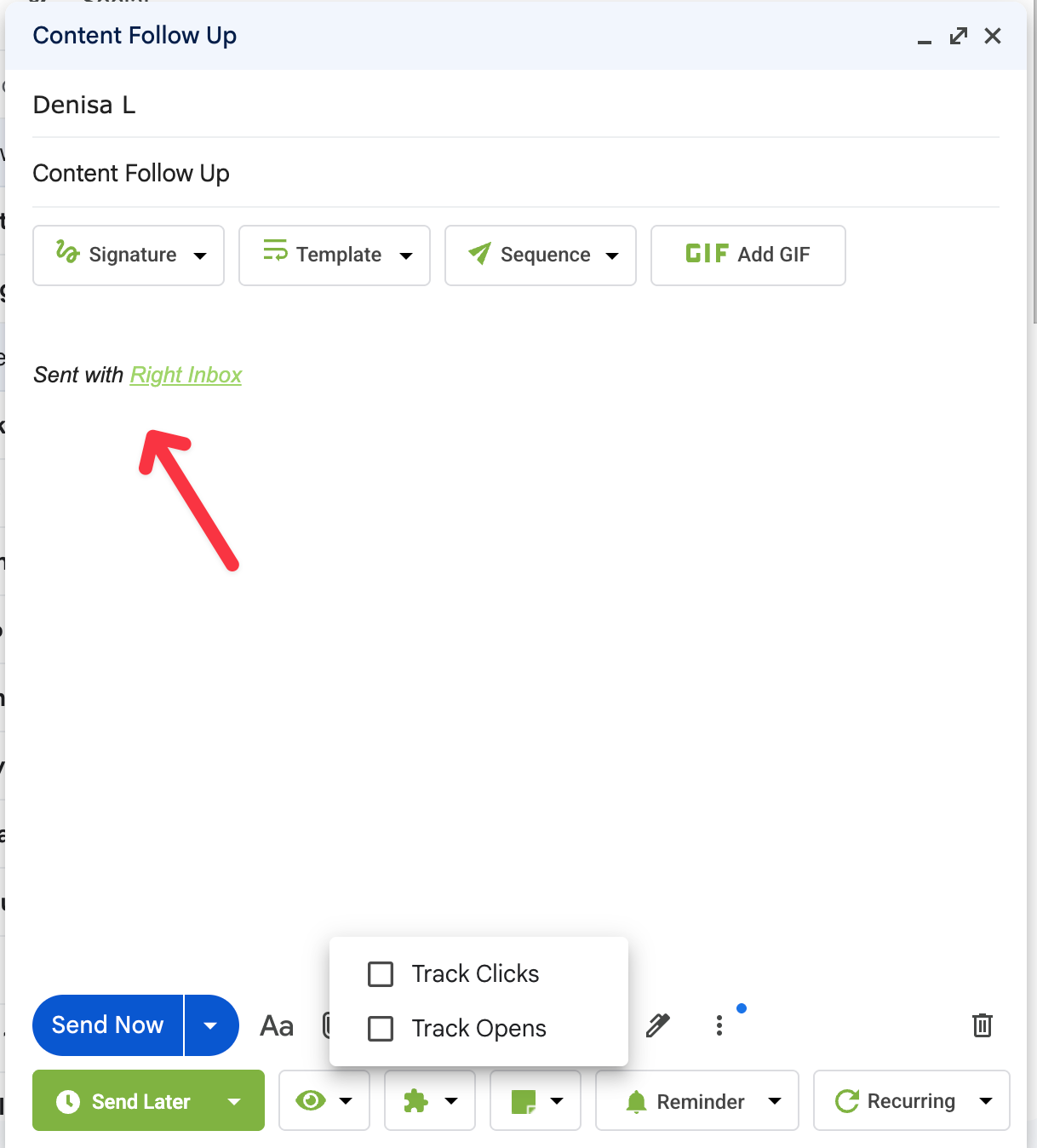
So if you're in a rush and forget to tick the boxes, that email goes out untracked. I did this more than once during testing.
The free plan gives you 5 tracked emails per month, one of the lowest limits on this list. If tracking is your main goal, RightInbox isn't the right fit on the free plan. Where it earns its place is pure scheduling: write an email at 11 PM, have it land at 9 AM their time. I used it for a week of Monday morning follow-ups and it worked exactly as expected, no missed sends, no delays.
Key Features:
- Email scheduling (send later, across time zones)
- Email tracking (5 emails per month on free plan)
- Follow-up reminders when emails go unanswered
- Automated sequences based on opens
- Email templates
- Mail merge for personalized bulk sends
Pricing: Free plan includes 5 tracked emails per month. Paid plans start at $9.95/month for unlimited tracking and advanced features.
My Experience: I use RightInbox when scheduling matters more than tracking. The convenience is real timed follow-ups, Monday morning sends, different time zones. But the manual steps add up: remove the signature, tick the tracking boxes, then send. Chrome Store reviews reflect this. Strong on scheduling, consistent complaints about the free tracking limit and the extra steps. If tracking is your priority, MailTracker or Mailsuite gives you more room without the friction.
5. Mailsuite (For unlimited tracking with signature)
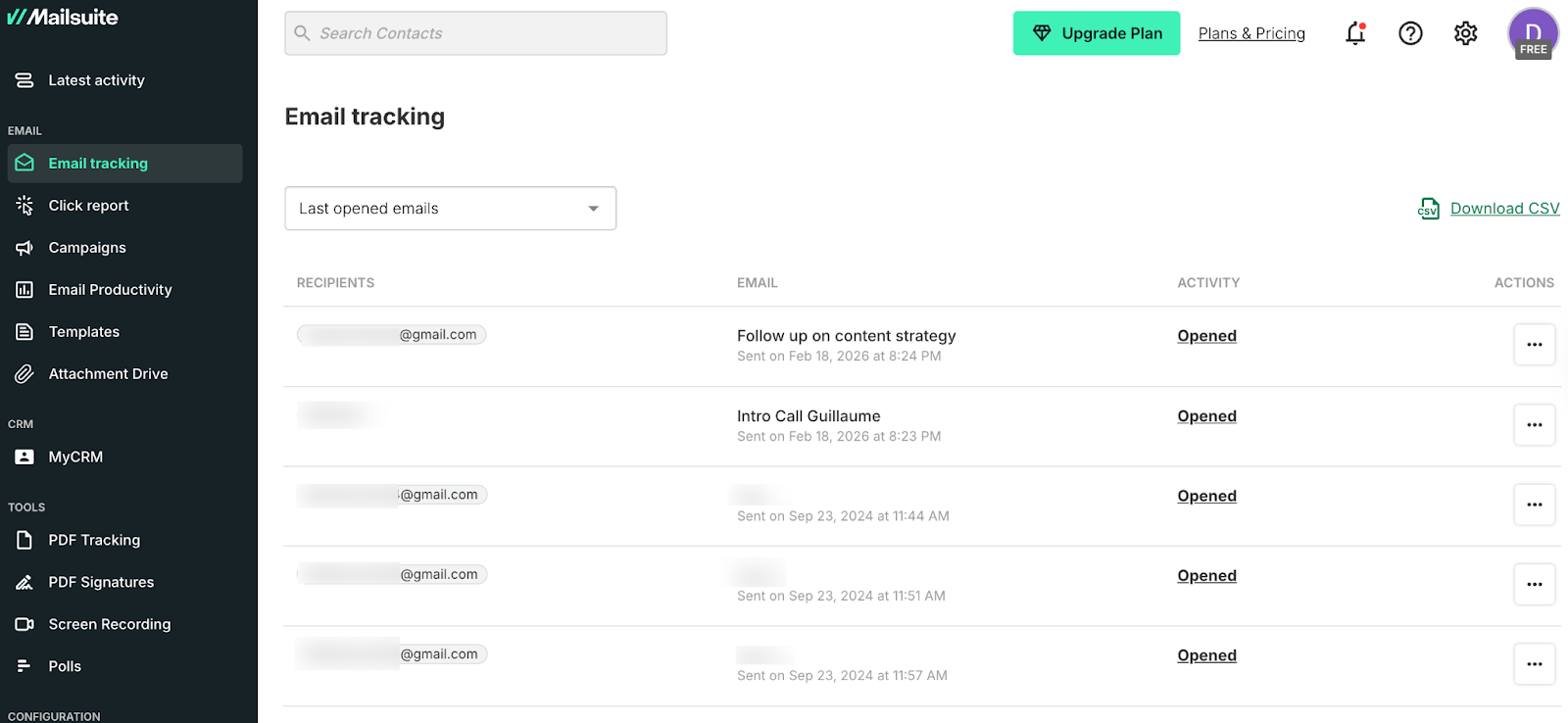
Mailsuite used to be called Mailtrack; they rebranded and refreshed the product a while back. I tested it specifically because I wanted to see how unlimited free tracking actually holds up in practice, not just on the pricing page.
The free plan genuinely delivers unlimited tracked emails. No monthly cap, no "you've used 18 of 20" warnings. For high-volume senders that's a real differentiator and honestly hard to beat on the free tier.
The catch is two things. First, the "Sent with Mailsuite · Unsubscribe" signature gets appended to every email automatically.

I tested it on a 40-email outreach campaign and it showed up every single time. There's no way around it on the free plan. For internal updates or mass outreach where branding doesn't matter, it's manageable.
For client proposals or professional outreach, recipients will see it. If you want to remove it, you need to do it manually every time: we wrote a full guide on how to remove the Mailsuite signature if you need it.
Second, like Snov, Mailsuite pushes you into an external dashboard to see your tracking data. The dashboard is clean and shows opens, clicks, and activity per email, but it means your tracking intelligence lives outside Gmail, not inside it. If you want everything in one place without switching tabs, that's worth knowing upfront.
What I noticed during testing: open notifications are slightly delayed compared to MailTracker. Not by much, but enough that if you're timing a follow-up call right after seeing an open, you'd want to factor that in.
Mailsuite is rated 4.4/5 on the Chrome Web Store with over 11,500 reviews.
Key Features:
- Unlimited email tracking on the free plan
- Individual tracking for group emails (see who opened what)
- Follow-up reminders for unopened emails
- Link tracking to see who clicked
Pricing: Free plan with unlimited tracking (includes Mailsuite signature). Paid plan starts at 9.99 EUR/month (~$10.60 USD) — removes the signature and adds scheduled emails, advanced alerts, and link/PDF tracking.
My Experience: The unlimited tracking is real and it works. But Mailsuite has grown into more than just an email tracker. There's a CRM, PDF tracking, screen recording, polls. For some people that's useful. For others it's more tool than they need when all they want is to know if someone opened their email.
Chrome Store reviews reflect the same split: high marks for the volume, consistent complaints about the signature. If you need clean professional emails the paid plan at 9.99 EUR/month is cheaper than most competitors on this list and worth it for the signature removal alone.
6. Boomerang (For email scheduling + AI writing tools)

Boomerang is rated 4.2/5 on the Chrome Web Store with over 2,100 reviews. I tested it for a month when I needed to schedule follow-ups across different time zones.
Here's what caught me off guard: I installed it, started sending emails, and noticed I wasn't getting any open notifications. Turned out I hadn't clicked the "Track" button manually in the compose window before each send. Unlike MailTracker, where tracking is automatic the moment you send, Boomerang requires you to actively click "Track" every time.

If you forget (and you will at least once) that email goes out untracked with no way to recover it. The screenshot above shows exactly what that looks like: the Track button sitting at the bottom of the compose window, easy to miss if you're in a rush.
The dashboard shows your tracked messages, but it's sparse. Three emails were tracked in my test, each requiring that manual step to get there. For a tool where tracking is supposed to be a feature, that friction adds up quickly.
Where Boomerang genuinely earns its place is in scheduling. Write an email at 11 PM, have it land at 9 AM their time. The "Send Later" button is right there in the compose window, the reminder feature works well, and it's the only tool on this list that works on both Gmail and Outlook, which is useful if you switch between platforms.
The AI writing assistant is decent for tone-checking drafts before sending, but it's not the reason you'd choose this tool.
Key Features:
- Email tracking (10 emails per month on free plan)
- Schedule emails to send later (great for different time zones)
- AI writing assistant to improve email tone and clarity
- Meeting scheduler with Zoom and Google Meet integration
- Recurring emails for regular updates or reminders
- Share your availability without showing full calendar details
Pricing: Track up to 10 emails per month for free. Paid plans start at $4.98/month for more tracked emails and advanced scheduling features.
My Experience: I use Boomerang when scheduling matters more than tracking. The manual tracking step is a UX problem. The Chrome Store's 4.2/5 rating is the lowest here and reflects that. If you need scheduling across Gmail and Outlook with light tracking, it covers both. If tracking is your priority, the manual activation will frustrate you fast.
Final Thoughts
After installing and testing all 6 extensions, here's what I learned: the friction points tell you more than the feature lists.
Boomerang and RightInbox both require manual steps to activate tracking. You'll forget at least once and lose data on an email that mattered. Mailmeteor and Mailsuite both add signatures that you have to manually remove every time.
Snov redirects you to an external dashboard before you can do anything. These aren't dealbreakers, but they're real patterns that show up in daily use, and the Chrome Store reviews reflect all of them.
The tools that stay out of your way are the ones worth using long-term. MailTracker activates automatically, lives inside Gmail, and sends you a real-time notification every time someone opens or reopens your email, without a dashboard, a signature, or a manual step. Mailsuite does the same at unlimited volume if you're willing to pay to remove the branding.
Match the tool to how you actually work. If you send a handful of important emails per month and need clean tracking, MailTracker covers it. If volume is your priority and the signature trade-off is acceptable, Mailsuite's unlimited free plan is hard to beat.
If scheduling matters as much as tracking, RightInbox or Boomerang fill that gap, just remember to tick the tracking box before you hit send.
All 6 took under 5 minutes to install. Try the one that fits and see how it changes the way you follow up.

